The surgeon plans
Owns the plan: picks the levels, places each screw on the scan, and approves it. Classic cases and deformity cases need different depth from the same tools.

Playscape · Client work · Mazor Robotics
Mazor X plans robotic spine surgery on a CT scan. I mapped the surgical workflow first, then designed a console where the surgeon's plan and the operator's steps follow one locked order: plan, align, operate.
One case. Three stages. No step out of order.
Context
Mazor X guides spine surgery with a robotic arm. Before the operation, the surgeon plans the case on the patient's CT: which vertebrae, which screws, at what angle and depth. The robot then executes that plan in the operating room.
This was client delivery at Playscape. The first part of the product was planning: a web console on a PC that turns a CT scan into a plan the robot can follow, and that the team in the room can trust.
Original planning screen, 2019. Spine scans with the screw paths marked on them.
Users
The original workflow named the surgeon as the user. Mapping the full case showed a second one: the system operator who runs the console in the room. The design had to serve both without splitting the product in two.
Owns the plan: picks the levels, places each screw on the scan, and approves it. Classic cases and deformity cases need different depth from the same tools.
Opens today's case, registers the approved plan to the patient on the table, then sends the arm screw by screw while the surgeon watches the live display.
Planning happens on a PC, with buttons and keyboard shortcuts, and touch supported. Tablet and phone are for viewing a plan, not editing it.
User flow
I started from the surgical workflow, not the interface: open the case, set up the plan, place the screws, review and export. Each decision point in the flow became a rule the screens had to keep, like a study that is not ready going back through ROI, segmentation and labeling first.
User flow. Planning a screw surgery, mapped from the original workflow. A cage surgery follows the same path with two vertebrae, a cage, alignment and simulation.
Key decision
In the operating room, the worst error is a step done out of order: aligning a plan nobody approved, or moving the arm before registration is verified. The structure had to make that impossible, not just unlikely.
The default
One workspace with every tool open, so planning, alignment and surgery can happen in any order the user chooses.
The decision
Three stages in a fixed order. Align unlocks only after the plan is approved, and Surgery only after registration is verified. The header always shows where the case stands.
Information architecture. One case moves through three locked stages, in a fixed order.
Process
Map the planning workflow
I characterized the planning stage step by step with the client, including the decision points and the loops, before drawing anything.
Wireframes for structure and function
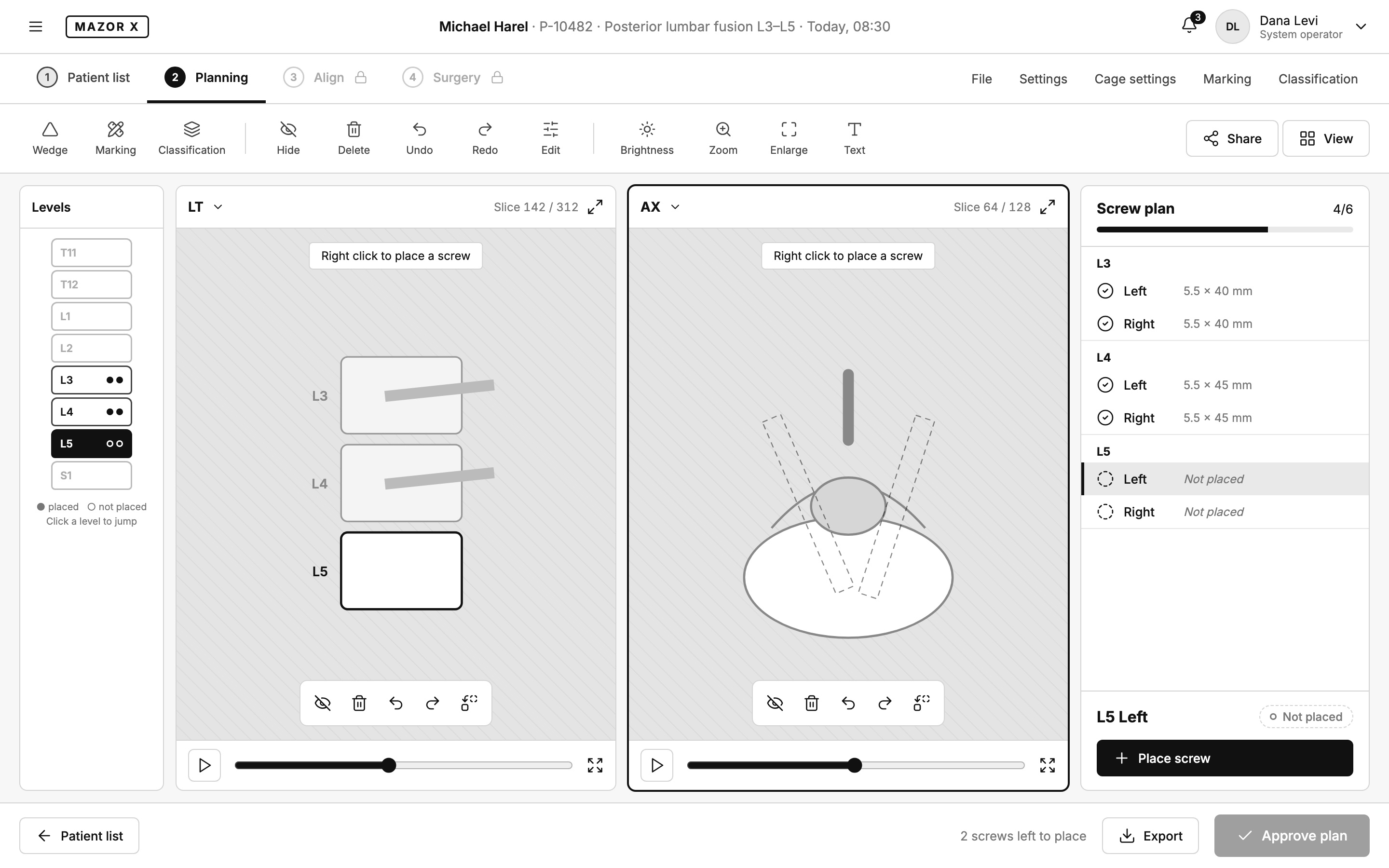
Grey wireframes settled the layout: where the levels, the two CT views and the screw plan sit, and what each stage unlocks.
High-fidelity design
Dark imaging surfaces for the scans, a light patient list, and one accent color reserved for the next action.
Reviews and feedback
Each round was reviewed against the workflow, so a change on screen never broke a rule in the flow.
Original presentation, 2019. Background, the user, the process, user flows and two planning-screen concepts, in Hebrew.
Wireframes
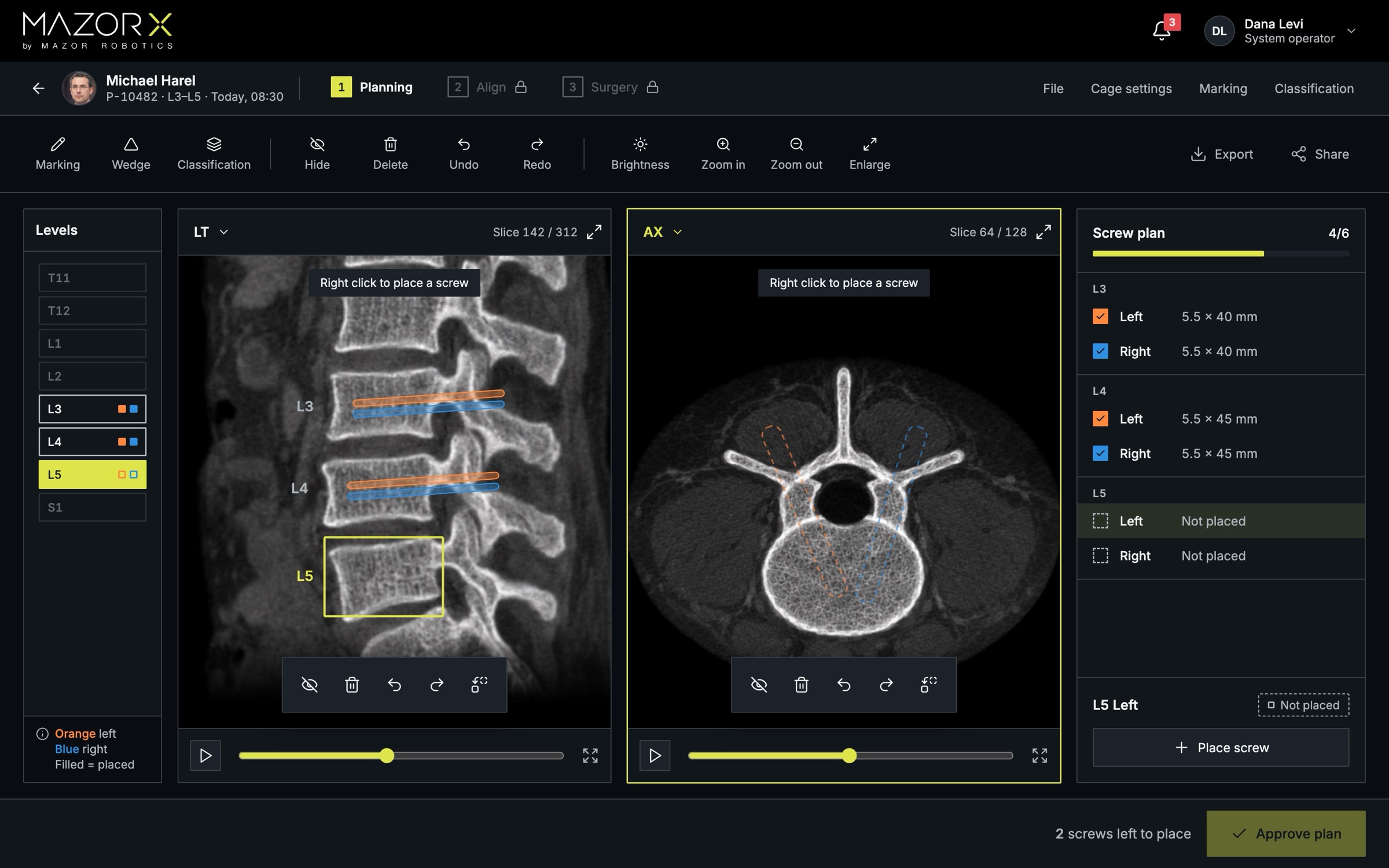
The wireframe fixed the structure of the planning screen. The final design kept it and added what grey boxes cannot show: the real scans, left and right screws in orange and blue, and a progress bar that tells the operator how much of the plan is left.
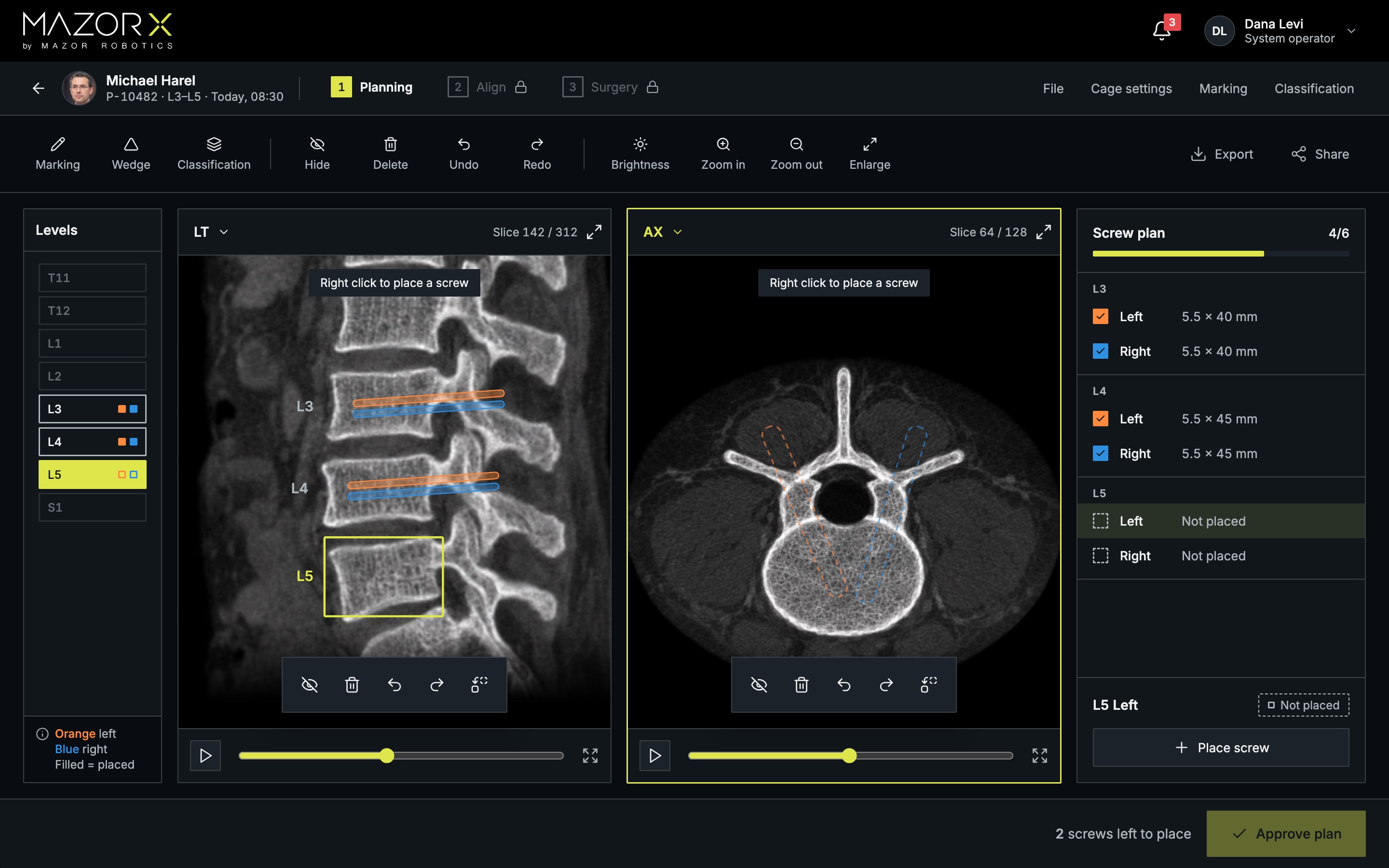
Planning screen. Drag to compare the wireframe with the final design.
The solution
Patient list: status before details
Each row shows whether the CT is uploaded and where the plan stands, with today's cases flagged. Selecting a patient opens a preview and one action: continue planning.
Planning: two views, one plan
The LT and AX views stay in sync on the selected level. Orange is left, blue is right, filled means placed. Approve plan stays disabled while screws are left to place.
Align: a checklist, not a form
Four registration steps in order, from mounting the robot to registering images to the CT plan. Surgery unlocks only when registration is verified.
Surgery: the operator drives, the surgeon watches
The operator panel lists the screws in order and sends the arm to the next one. Free Hand needs the arm cleared first, and the surgeon sees a live navigation display.
Patient list. CT and plan status first.
Align. Four steps, then surgery unlocks.
Surgery. Screw by screw, with the arm.
Prototype
One case, end to end: pick the patient, place the last two screws, approve the plan, register it to the patient, and send the arm. Try the prototype to click through it yourself.
Rebuilt in 2026 from the original workflow, slides and wireframes. Patients, names and numbers are invented.
Reflection
Screw paths on a spine scan still start with the sequence, not the interface. The same rule held on lighter client work: settle what has to happen, then draw the screen that makes that sequence readable.